
Lumina - Your AI Confidant
Shenzhen Boqing Automation Co., Ltd.Entertainment
4.5242.00 Reviews
- Version
- 1.0.4
- Installs
- 100.00K
- Age Rating
- Mature 17+
Screenshots

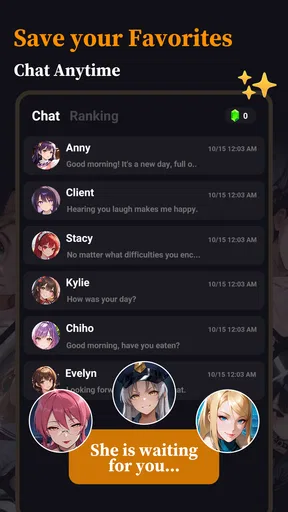


Our Review of Lumina - Your AI Confidant
 Analysis by Appyee
I approached Lumina - Your AI Confidant as an entertainment app for people who enjoy conversational roleplay and imaginative, character-led stories. Its main appeal is simple to understand: instead of reading a fixed script or watching a show from beginning to end, you interact with an AI and help shape the direction of the exchange. In practice, that makes the quality of your prompts and your patience during setup just as important as the app itself.
My experience is that Lumina is most interesting when treated as a creative conversation space rather than a replacement for a traditional chatbot, social network, or streaming service. You bring the situation, tone, and boundaries; the app responds within that imagined setting. That can be relaxing after a long day, useful for casual storytelling, or entertaining when you want a fictional conversation that changes with your choices.
It is listed in the Entertainment category and comes from Shenzhen Boqing Automation Co., Ltd. The app is free to install, although optional purchases range from $3.49 to $99.99 per item. It is intended for mature audiences, carrying a Mature 17+ rating, so I would not treat it as a family-friendly app simply because the basic download costs nothing.
Where the first Lumina session can become confusing
The first difficulty is knowing what kind of experience to expect. Lumina is not a conventional messaging app where you chat with real contacts, and it is not a conventional storybook with a fixed ending. The conversation depends heavily on how clearly you establish the scene. A short message such as “Tell me a story” leaves a lot of room for the AI to choose the setting, mood, characters, and pace. That freedom can be fun, but it can also produce a beginning that feels vague or unlike what you had in mind.
I got better results by treating the opening message like a compact creative brief. I would describe who I was playing, what kind of atmosphere I wanted, what should happen first, and what tone I preferred. For example, a request that identifies a quiet mystery, a cautious main character, and a slow reveal gives the conversation more direction than a single broad request. This is one of the most important practical lessons: the opening prompt is part of the setup, not just the first line of dialogue.
Another possible sticking point is the difference between roleplay and ordinary conversation. In a normal assistant app, I might ask for a direct answer and expect a concise response. In Lumina, a direct question can be interpreted as dialogue inside the scene. That is useful when I want immersion, but less convenient when I want a factual answer or a quick task completed. If you need an app for reminders, research, writing emails, or dependable practical instructions, this is not the right category of tool.
The mature age label also matters before anyone starts a session. I would be careful about handing the phone to a younger family member, and I would avoid assuming that a free entertainment download is automatically suitable for shared household use. The rating sets an important expectation about the type of content and conversations a user may encounter.
Why a good prompt does more than a long prompt
Writing more is not always the solution. Long messages can bury the most important instructions. I found it more effective to separate the request into a few clear elements: the setting, my role, the desired mood, and the immediate action. If I wanted a tense scene, I would say so directly instead of adding several paragraphs of background before the conversation had started.
I also recommend correcting the direction early. If the response becomes too dramatic, too fast, or too casual, say what needs to change in the next message. Waiting several turns while hoping the app will eventually understand can make recovery harder because the unwanted tone becomes part of the conversation history. A brief correction such as “Keep the mystery subtle and let the characters speak naturally” is usually more useful than restarting with an entirely new idea.
Setup checks that prevent avoidable frustration
Before judging the quality of the roleplay, I would first make sure the device is compatible and the app is current. Lumina requires Android 7.0 or later, and the current version is 1.0.4. That does not guarantee that every device will behave identically, but it gives you a sensible first check if installation or opening problems appear. Updating through the normal app store route is also a better first step than repeatedly reinstalling an unchanged copy.
The app was released on October 20, 2025, so I would keep expectations realistic about a relatively new product. A newer app can feel fresh and focused, but it may also have rough edges in onboarding, conversation recovery, or presentation. I would not interpret one awkward first exchange as proof that the entire concept fails. At the same time, I would pay attention to repeated problems rather than excusing every issue as part of the experience.
A stable connection is a sensible check whenever an AI conversation stalls or takes longer than expected to continue. I would try a different network, reopen the app, and send a short test message before rewriting a carefully prepared scenario. If a simple message also fails, the problem is more likely to be the session or connection than the wording of the story prompt.
It is also worth deciding how you want to use the free version before exploring purchases. Lumina is free, but its optional in-app items are priced from $3.49 to $99.99 per item. I would not buy anything merely to solve a temporary loading problem or a disappointing response. First establish whether the basic conversation style suits you, then consider whether an optional purchase adds enough value for your personal use.
That approach is especially important for people who tend to experiment quickly. Roleplay apps can encourage curiosity because every new prompt suggests another possibility. Setting a personal spending limit before browsing purchase options keeps the creative side of the app from turning into an impulsive decision. The free entry point makes trying Lumina easy; it does not mean every optional item will be worthwhile for every user.
A practical way to begin a first story
For a first session, I would avoid starting with an enormous world containing many characters and several plotlines. Begin with one location, one main relationship, and one immediate problem. This gives you a clearer way to judge whether the AI is following your direction. Once the exchange feels consistent, add a second character or a new complication.
I would also decide whether I want to speak as myself or as a fictional character. Mixing those approaches without saying so can make the conversation feel unstable. A simple instruction such as “I am playing a detective; keep the narration outside my character’s thoughts” creates a useful boundary. If I later want to change perspective, I would state that as a deliberate transition rather than quietly shifting style.
Another helpful habit is saving a short personal template outside the app. I might keep a note containing the preferred tone, the role I am playing, and a few boundaries for the scenario. If a conversation ends unexpectedly or I want to begin again, that template makes recovery faster. It also helps me compare different sessions fairly instead of changing every variable at once.
Recovering a conversation when the story loses direction
Every AI roleplay experience can drift. A character may become too agreeable, forget the mood, repeat a phrase, or move the plot forward faster than I wanted. When that happened, I found that a reset message worked better than arguing with the previous response. I would briefly identify the problem, restate the current scene, and give one clear instruction for the next turn.
For example, I might write: “Return to the quiet train station, keep the two characters cautious, and reveal only one new clue.” This does three jobs at once. It brings the setting back, defines the emotional pace, and limits the amount of new information. The technique is more reliable than saying only “That was wrong,” because it gives the conversation a replacement direction.
If the session becomes too tangled, starting a fresh scenario may be more efficient than repairing every detail. This is a real trade-off with open-ended AI entertainment: flexibility allows surprising turns, but it also means continuity may require active guidance from the user. People who want a carefully edited plot with guaranteed consistency will probably prefer a traditional interactive fiction title or a professionally written game.
I would use short checkpoints during a longer exchange. Every so often, I could summarize the current location, the characters’ goals, and the unresolved question in a single message. This is not glamorous, but it gives the conversation a clean reference point. It is particularly useful when I am building a story over several sessions and do not want to rely on memory alone.
Another recovery technique is changing the scale of the request. If the AI is producing overly broad replies, ask for one scene or one spoken exchange at a time. If the responses feel flat, add a concrete sensory detail or a specific emotional conflict. This lets me adjust the output without abandoning the entire premise. The key is to change one element at a time so I can tell what actually improved the result.
Handling boundaries and mature themes responsibly
Because Lumina is rated Mature 17+, I would approach roleplay with the same judgment I use for any mature entertainment. I would avoid entering private identifying information into an imaginative conversation, especially when the purpose is simply to create a fictional scene. I would also make clear boundaries in the prompt when I want a certain topic excluded or handled lightly.
That does not remove every possible surprise from an AI-generated conversation, but it gives me more control over the direction. If a response crosses the tone I wanted, I would stop the scene rather than trying to force it back into shape. Users who are uncomfortable with mature themes, unpredictable fictional dialogue, or open-ended character behavior should choose a more tightly controlled entertainment format.
When the app is not the cause of the problem
It is easy to blame Lumina when a roleplay feels dull, but the result can depend on the task being asked of it. A vague prompt, a constantly changing premise, or a request that mixes several incompatible tones can make almost any conversational system appear inconsistent. I would test the app with a small, focused scenario before deciding that its responses are unusable.
Device performance and network conditions can also affect the experience. If the app opens but messages fail intermittently, I would check whether other online services are behaving normally. If the entire device is struggling, closing unused apps and restarting it is a reasonable general troubleshooting step. If only one particular conversation behaves badly while a new short session works, the issue may be the complexity of that conversation rather than the installation itself.
There is also a difference between a technical failure and a creative mismatch. A response that loads normally but chooses the wrong mood is not the same as a connection error. The first calls for clearer direction or a fresh scenario; the second calls for ordinary app and network checks. Separating those problems saves time and prevents unnecessary purchases or repeated reinstalls.
I would judge Lumina over several kinds of prompts rather than one test. Try a calm conversation, a short mystery, and a character-focused scene. If the app feels engaging across those different uses, it is probably a good match. If every session feels like work because you must constantly correct the tone, a conventional story game or a more structured entertainment app may suit you better.
How it compares with familiar alternatives
Compared with streaming entertainment, Lumina offers participation instead of a finished performance. A film gives you polished pacing, consistent acting, and a defined conclusion. Lumina gives you room to interrupt, redirect, and invent. The exchange is less predictable and usually less polished, but it can feel more personal when the prompt and response align.
Compared with ordinary chatbots, its strongest identity is imaginative roleplay. A general assistant is usually better for practical questions, summaries, planning, and direct explanations. Lumina makes more sense when the goal is to inhabit a fictional situation or develop a conversation that would not exist in everyday life. Choosing between them depends less on which app is “smarter” and more on whether you want utility or immersion.
Compared with interactive fiction and story-driven games, Lumina can feel more open because the user is not limited to a predefined menu of choices. The trade-off is that a traditional game normally provides stronger rules, clearer progression, and more dependable continuity. If you care about puzzles, achievements, visual presentation, or a carefully authored ending, a game is likely the better purchase. If you value improvisation and do not mind guiding the experience, Lumina has a distinct reason to exist.
The app has attracted a 4.5 average from around 1.8 thousand ratings, with more than 100 thousand installs and 242 written reviews. Those figures suggest that it has found an audience, but they do not tell me whether every user wants the same style of entertainment. I would read the overall response as encouraging rather than conclusive, especially because AI roleplay preferences vary so widely.
My practical verdict after using Lumina
Lumina works best for a curious adult who enjoys steering a story one message at a time. I can recommend it to someone who wants a low-commitment creative escape, likes experimenting with character voices, or enjoys conversations that do not follow a fixed script. The free installation makes it easy to test, and the app’s entertainment focus is clear once I stop expecting it to behave like a productivity assistant.
I would skip it if you want guaranteed plot quality, strict continuity, a child-safe experience, or a tool for reliable everyday answers. I would also be cautious if you dislike writing prompts or correcting an AI when it wanders. The most rewarding sessions require some participation from me; Lumina is not a passive button that automatically produces a perfect story.
My strongest advice is to start small, define the tone, and treat recovery as part of the creative process. Check Android compatibility and the app version before troubleshooting, test the connection with a simple message, and do not use purchases as a substitute for deciding whether the basic experience suits you. If a scene drifts, summarize the setting and give one next action instead of piling on several corrections.
With those expectations, Lumina feels like a promising conversational entertainment option rather than a universal AI solution. Its value comes from the space between a chatbot and a story game: I get more freedom than a fixed narrative, but I also accept more unpredictability. For the right user, that exchange is the whole point. Use it when you want to co-create a scene, not when you need a finished one.
Verdict
Strengths of Lumina - Your AI Confidant
- Offers a private-feeling space for personal thoughts and daily reflection.
- AI replies are available anytime, without scheduling or waiting for a person.
- Simple chat-based design makes it easy to start sharing immediately.
- Can help users organize emotions and identify recurring concerns.
- Useful for journaling prompts, self-check-ins, and gentle motivation.
Limitations of Lumina - Your AI Confidant
- AI responses may feel generic when discussing complex or deeply personal issues.
- It should not replace professional mental-health care or crisis support.
- Privacy depends on the app’s data policies and how conversations are stored.
- Some features or extended usage may require a subscription or in-app purchase.
- Occasional misunderstandings can lead to advice that does not fit your situation.
Similar Picks in This Category
View All
Google Play Games
Google LLC3.9

Netflix
Netflix, Inc.4.8

YouTube Kids
Google LLC4.2

Disney+
Disney4.4

Prime Video
Amazon Mobile LLC4.7

Steam
Valve Corporation3.2
Frequently Asked Questions
What is Lumina - Your AI Confidant designed to do?
Lumina - Your AI Confidant is an AI-powered companion intended for conversation, reflection, and everyday support. You can use it to discuss your thoughts, ask questions, explore ideas, organize your feelings, or simply have a friendly chat. It is best understood as a digital conversational tool rather than a replacement for real relationships, professional advice, or qualified mental-health care.
Does Lumina provide reliable mental-health or medical advice?
Lumina may offer empathetic responses, general suggestions, and prompts that can help you reflect on a situation, but its answers should not be treated as professional medical, psychological, legal, or emergency advice. AI can misunderstand context or produce inaccurate information. If you are experiencing a crisis, feel unsafe, or need diagnosis or treatment, contact a qualified professional or an appropriate emergency service instead of relying only on the app.
Is my conversation with Lumina private and secure?
Before sharing sensitive information, review Lumina’s privacy policy and the permissions requested by the app. Conversations with an AI service may be processed or stored to provide features, improve performance, or maintain the service, depending on the developer’s practices. Avoid entering passwords, financial details, identity documents, or information about other people unless you clearly understand how your data is handled, retained, and deleted.
Does Lumina require an account or offer paid features?
The availability of account requirements, free access, subscriptions, trials, and in-app purchases can vary by platform, region, and app version. Check the listing carefully before downloading and review the subscription terms before confirming payment. If a trial is offered, note its renewal date and cancellation rules. Removing the app usually does not cancel an active subscription, so manage billing through the relevant app store.
Can Lumina work offline, and what device permissions does it need?
AI companion apps commonly require an internet connection because conversations are processed through online services, so functionality may be limited when you are offline or have an unstable connection. The exact requirements depend on the current version of Lumina and your device. During installation, check permissions such as microphone, notifications, or storage, and allow only those that are necessary for the features you intend to use.
